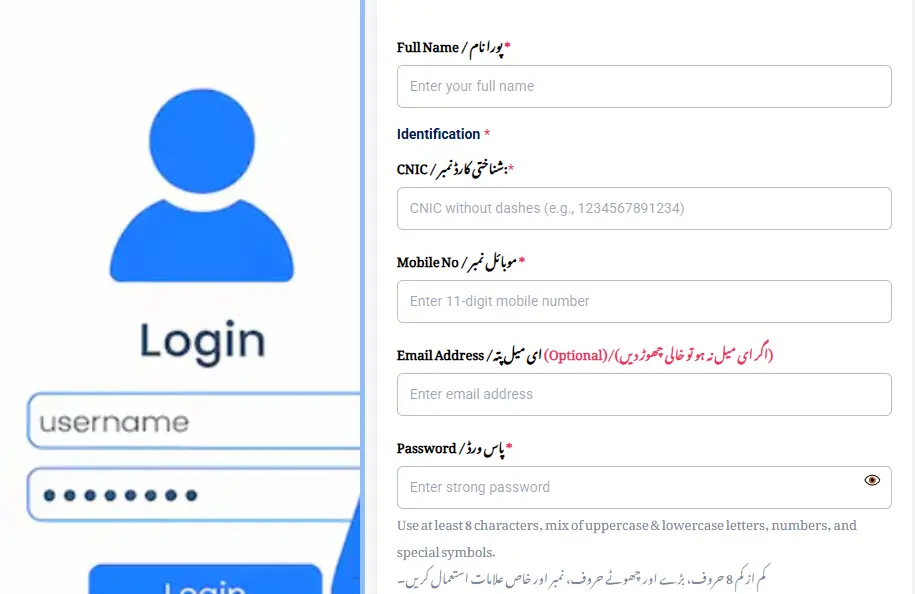
Quick Steps: To check your Apni Chhat Apna Ghar application status, visit acag.punjab.gov.pk, click "Login" or "Track Application," enter your 13-digit CNIC without dashes, complete the CAPTCHA, and view your current stage. The status will show one of seven values, Submitted, Under Verification, Field Verification, PMT Pending, Approved, Rejected, or Loan Disbursed. Each status has a specific next step explained below.
If you applied for Apni Chhat Apna Ghar (ACAG) two weeks ago and have heard nothing, you're not alone. With over 1.06 million active applications in the verification queue as of January 2026, the Punjab Housing & Town Planning Agency (PHATA) is processing applications in batches that take 6,8 weeks each. The status check portal is the only reliable way to know where your file actually sits, phone calls to the helpline often give generic answers because helpline staff don't have access to your full case file.
This guide shows the exact CNIC-based status check process, decodes each of the seven possible status messages, and gives you the specific action to take for each one. We've also included the most common errors the portal throws and how to fix them in under five minutes.
Quick Facts: ACAG Status Check at a Glance
| Detail | Information |
|---|---|
| Official Status Check Portal | acag.punjab.gov.pk |
| What You Need | 13-digit CNIC (no dashes) and registered password |
| Status Check Fee | Zero, completely free |
| Update Frequency | Daily (overnight, around 2:00 AM PKT) |
| SMS Alerts | Sent to registered mobile at each major status change |
| Average Verification Time | 6,8 weeks from submission |
| Helpline (toll-free) | 0800-09100 |
| Backup Method | Visit your District DC Office with CNIC |
How to Check Apni Chhat Apna Ghar Status by CNIC, Step-by-Step
Step 1: Open the Official ACAG Portal
Type acag.punjab.gov.pk directly into your browser address bar. The official portal is hosted on the .gov.pk domain, anything else (.com.net.pk lookalikes) is a third-party site that cannot actually check your status. Many copycat sites simply redirect you to the official portal anyway, but they collect your CNIC data along the way.
Step 2: Click "Login" or "Track Application"
On the homepage, you'll see two options near the top right:
- Login, if you already have an account from when you registered
- Track Application, for direct status checks via CNIC
Most applicants should use Login, since this gives you the full dashboard with document status, verification history, and disbursement details.
Step 3: Enter Your CNIC and Password
Type your 13-digit CNIC without any dashes. The portal rejects CNICs with dashes, "12345-1234567-1" is invalid, "1234512345671" is correct.
Then enter the password you created during registration. If you've forgotten it, click Forgot Password to receive a reset link via SMS to your registered mobile number.
Step 4: Complete the CAPTCHA
The portal uses a 5-character text CAPTCHA. Type the characters exactly as shown, the CAPTCHA is case-sensitive. If the CAPTCHA looks blurry, click the refresh icon next to it to load a new one.
Tip: If the CAPTCHA never loads, disable any ad-blocker on the .gov.pk domain. The CAPTCHA is served from a separate Punjab IT Board (PITB) server that ad-blockers sometimes mistakenly block.
Step 5: View Your Application Status
After login, you'll land on your Application Dashboard. The top section shows your current status in one of seven possible labels (decoded in detail below). Below it, you'll see:
- Tracking ID, your unique application reference
- Submission Date, when your form was originally received
- Current Stage, exactly where in the pipeline your file sits
- Last Updated, the date PHATA last touched your file
- Required Action, if any document needs re-uploading
If your status hasn't changed in 14 days, that's normal during peak processing. The system updates daily but most applications spend 2,3 weeks at each stage.
What Each Status Message Actually Means
This is where most competitor guides fall short, they list status names but don't tell you what to do. Here's a complete decoder for all seven possible statuses on the ACAG portal:
Status 1: "Submitted" / "Application Received"
What it means: Your form was successfully received by PHATA. Your file is in the intake queue but hasn't yet been picked up by a verification officer.
How long it lasts: Usually 3,10 days for current batches.
What you should do: Nothing yet. The system will move you to the next stage automatically. Avoid calling the helpline at this stage, they cannot speed up intake.
Status 2: "Under Verification" / "Document Review"
What it means: A PHATA officer is reviewing your uploaded documents. They are checking that your CNIC matches NADRA records, your property documents are valid, and your scanned files are readable.
How long it lasts: 1,3 weeks.
What you should do: Make sure your phone is on and you can answer calls from unknown numbers. PHATA verification officers sometimes call to ask quick clarifying questions about your documents. Missed calls can stall your application by another 2 weeks.
Status 3: "Field Verification Scheduled" / "Patwari Visit Pending"
What it means: PHATA has assigned a local Patwari (revenue officer) to physically visit your plot and verify it exists at the address claimed, that you have actual possession, and that the size matches what your registry says.
How long it lasts: 1,2 weeks until the visit, plus 3,5 days for the Patwari to file the report.
What you should do:
- Keep your original property documents (Fard, Registry, Allotment Letter) ready at home
- If you're not always at the plot, share a neighbour's or family member's contact number who can confirm your ownership and presence
- The Patwari may show up unannounced, be polite, cooperate, and never offer money. Bribery is a common scam attempt at this stage and will cause your application to be cancelled if reported.
Status 4: "PMT Score Pending" / "NSER Cross-Check"
What it means: Your application has gone to BISP for verification of your PMT score in the National Socio-Economic Registry. The system confirms your household's poverty score is 60 or below, required for ACAG eligibility.
How long it lasts: 1,2 weeks.
What you should do:
- If your last NSER survey was more than 3 years ago, your PMT score may be outdated. Visit your nearest BISP Tehsil Office and request a resurvey.
- If your status stays in this state for over 3 weeks, call the helpline 0800-09100 and reference your Tracking ID.
Status 5: "Approved" / "Loan Sanctioned"
What it means: Your application has cleared all verification stages. PHATA has approved your interest-free loan of up to Rs 1.5 million.
What happens next:
- You will receive an SMS with the loan agreement signing date and venue
- You'll need to visit the assigned PHATA Field Office (or DC Office) within 15 days to sign the loan agreement
- Bring originals of all documents you uploaded online
- After signing, the first tranche is disbursed to your bank account, typically within 7 working days
- Subsequent tranches are linked to construction milestones (foundation complete, walls up, roof poured, finishing)
What you should do: Don't delay the agreement signing, if you miss the 15-day window, your approval can lapse and the slot is reassigned to the next applicant in queue.
Status 6: "Rejected" / "Application Declined"
What it means: Your application did not meet one or more eligibility criteria. The portal will display a specific rejection reason alongside this status.
Common rejection reasons and fixes:
| Rejection Reason | What It Means | How to Fix |
|---|---|---|
| PMT Score Above 60 | Your household poverty score is too high | Request BISP resurvey; reapply after score updates |
| Land Size Exceeds Limit | Your plot is bigger than 5 marla urban or 10 marla rural | Cannot fix, this scheme is not for you. Look at PM Apna Ghar Programme instead |
| Already Own Constructed House | NADRA/excise records show another property | Verify if it's a clerical error; if real, you're not eligible |
| Bank Defaulter | You have an outstanding default on State Bank database | Settle the default with the relevant bank; reapply after clearance certificate |
| Property Document Issue | Fard or Registry has errors or unclear ownership | Get the document corrected at PLRA, then reapply |
| Income Above Rs 60,000 | Your monthly income exceeds the threshold | Cannot fix, apply for federal PM Apna Ghar Programme instead |
| Duplicate Application | Same CNIC submitted twice | Withdraw the duplicate; the original continues |
| Criminal Record | An FIR or court case is open against you | Resolve the case legally; reapply after clearance |
What you should do: Read the rejection reason carefully. Most reasons are fixable within 2,6 weeks. If your rejection seems wrong (e.g., the system shows you own a property you don't), file a written appeal at your DC office with supporting documents.
Status 7: "Loan Disbursed" / "Construction Active"
What it means: Your loan agreement is signed and at least the first tranche of money has been released to you. You should now begin construction.
What you should do:
- Begin foundation work within 3 months of the first disbursement
- Document each construction stage with photos (PHATA will request these for the next tranche)
- Submit a milestone completion request through the portal when foundation, walls, roof, or finishing is complete
- Keep your monthly installment of Rs 14,000 (or your specific approved amount) paid on time, late payments add to your total and can pause future tranches
Status Check Without Logging In, The CNIC-Only Quick Method
If you've forgotten your password and don't want to wait for a reset, the ACAG portal allows a limited CNIC-only status check:
- Visit acag.punjab.gov.pk
- On the homepage, click "Track Application" (not "Login")
- Enter your 13-digit CNIC without dashes
- Enter the mobile number you registered with
- Click Get OTP, a 6-digit code is sent to your mobile
- Enter the OTP and submit
The CNIC-only method shows you the basic status (Submitted / Under Verification / Approved / Rejected) but does not show document status or the verification officer's notes. For full details, you need to log in with your password.
SMS Alerts, What to Expect
The ACAG system sends SMS alerts at each major status change to your registered mobile number. Here's the full sequence you can expect:
| SMS Type | Sample Content | Stage |
|---|---|---|
| Confirmation | "Your ACAG application [Tracking ID] has been received. Updates will follow." | After submission |
| Verification | "Your ACAG application is under document review. Keep your phone available for any clarification." | Days 5,10 |
| Field Visit | "A Patwari will visit your plot for verification within 7 days. Keep documents ready." | Week 2,3 |
| Approval | "Congratulations. Your ACAG loan of Rs [X] is approved. Visit [Office] by [Date] to sign." | Week 6,8 |
| Rejection | "Your ACAG application has been declined. Reason: [Specific reason]. Login portal for details." | Anywhere in the cycle |
| Disbursement | "Tranche 1 of Rs [X] disbursed to your bank. Begin construction." | Within 7 days of signing |
If you stop receiving SMS alerts, check that your registered mobile is still active and SIM is not blocked. PTA-blocked SIMs do not receive government SMS reliably.
Common Status Check Errors and How to Fix Them
After analyzing applicant complaints across multiple Pakistani forums, helpline call patterns, and portal feedback channels, here are the top errors and their actual fixes:
"CNIC not found"
- You may not have completed the registration step. Many applicants think they registered but only created an account without submitting the application form.
- Solution: Log in (not Track Application), if you see a partial form, complete and submit it.
"Invalid credentials"
- Most common cause: dashes in the CNIC. Type as 1234512345671, not 12345-1234567-1.
- Second most common cause: caps lock on for the password.
"Account locked, try again in 30 minutes"
- Three wrong password attempts trigger a 30-minute lockout.
- Solution: Wait it out, or use Forgot Password to reset.
"Status not loading / blank dashboard"
- Browser issue, clear cache and cookies, then try again.
- Better solution: Use Chrome or Edge in Incognito Mode. The portal sometimes conflicts with cached data from previous sessions.
"OTP not received"
- Network delays are common on Zong and Ufone. Wait 5 full minutes before clicking Resend.
- If still nothing, your registered mobile may have changed or been deactivated. Visit DC Office to update mobile number.
"Status hasn't changed in 4 weeks"
- Normal during peak processing periods (post-budget, post-phase announcement). The current batch you're in could be 50,000+ applications deep.
- Action: Call 0800-09100 with your Tracking ID for a manual check.
"Application says 'Pending' for months"
- Most often indicates a stalled field verification, Patwari may not have visited or report not filed.
- Action: Visit your nearest PHATA Field Office or DC Office in person. In-person inquiries get resolved faster than phone calls.
Application Status Pending, What "Pending" Actually Means
"Pending" is the most-asked-about status because it can sit there for weeks. It does not mean rejected. It means PHATA has your file but hasn't completed the next verification stage yet.
Sub-types of "Pending":
- Pending Document Review → in queue for officer to read your uploads
- Pending Field Verification → assigned to a Patwari, awaiting their visit
- Pending NSER Cross-Check → with BISP for PMT score verification
- Pending Final Approval → all checks done, awaiting committee sign-off
If your dashboard says "Pending" without a sub-label, the system hasn't yet routed your file. Expect movement within 7,10 days.
When to Visit the DC Office Instead of Checking Online
The online portal is faster for routine status checks, but physical visits get faster results for complex issues. Visit your District Deputy Commissioner (DC) Office (every Punjab DC office has a dedicated ACAG desk) when:
- Your status has been stuck for over 4 weeks
- The portal shows an error you can't resolve
- You received an unclear rejection reason
- You suspect a clerical mistake in your file
- Your Patwari verification visit hasn't happened in 3+ weeks
- Your registered mobile number changed and you can't receive SMS
What to bring:
- Original CNIC
- Your Tracking ID (write it down before the visit)
- Original property documents (Fard, Registry)
- Any SMS messages from ACAG (screenshot or printout)
Frequently Asked Questions
Visit acag.punjab.gov.pk, click "Track Application," enter your 13-digit CNIC without dashes, complete the CAPTCHA, and view your current status. For full details including document status and officer notes, log in with the password you created during registration.
The ACAG status check is completely free. The Punjab Government does not charge any fee at any stage of the application, registration, status check, verification, or disbursement. Anyone asking for money to "check your status" or "speed up your application" is a scammer. Report them to the helpline 0800-09100 or FIA Cybercrime (1991).
The ACAG portal updates daily, usually overnight around 2:00 AM PKT. After submission, expect to see status changes every 1,3 weeks. The full verification cycle from "Submitted" to "Approved" takes 6,8 weeks in normal periods, longer during peak processing.
"Pending" simply means your file is in the queue for the next verification stage. It is not a rejection. Pending could mean Document Review, Field Verification (Patwari visit), NSER cross-check with BISP, or Final Committee Approval. Expect updates every 7,10 days.
Field verification requires a Patwari to physically visit your plot, which can be delayed by Patwari workload, weather, or scheduling issues. If your status sits in this stage for over 3 weeks, visit your DC Office in person with your Tracking ID, physical follow-ups resolve faster than phone calls.
Yes. Use the Track Application option on the ACAG portal homepage. You'll need your 13-digit CNIC and registered mobile number to receive an OTP. This shows basic status only. For full details (document review notes, officer comments), you need to log in with your password.
Click Forgot Password on the login page. You'll receive a password reset link via SMS to your registered mobile number, valid for 30 minutes. If your registered mobile is no longer active, visit your DC Office with original CNIC to update it before you can reset.
Read the specific rejection reason on your dashboard. Most rejections (PMT score above 60, document issues, NSER mismatch) are fixable within 2,6 weeks. After fixing the underlying issue, you can re-apply. If the rejection seems wrong, file a written appeal at your DC Office with supporting documents, appeals are reviewed within 30 days.
Yes. The ACAG system sends SMS alerts to your registered mobile at every major status change, submission, verification, field visit, approval, rejection, and disbursement. If you stop receiving SMS, your mobile may be PTA-blocked or your number changed in NADRA records, visit a NADRA centre to verify.
Yes, for the Apni Zameen Apna Ghar (AZAG) free plot scheme, balloting results show in the same dashboard with a separate "Balloting Result" tab. Phase 1 balloting was held on 26 November 2025; Phase 2 dates are pending. ACAG (the construction loan) does not use balloting, applications are processed on first-come, first-served eligibility.
"Action Required" means PHATA needs you to do something before they can proceed, usually re-upload a document that was unclear or missing. Click on the alert to see exactly what's needed. Respond within 15 days or your application moves to "Hold" status, which can lead to closure.
Yes. The ACAG portal works on mobile browsers, but switch to Desktop Mode if the form fields don't display properly. Chrome on Android and Safari on iPhone both work. Avoid the Facebook in-app browser, many users report the CAPTCHA fails to load there.
Beware of Fake Status Check Websites
Multiple fake "ACAG status check" websites have appeared in Google search results and Facebook ads. They show a fake form, collect your CNIC and personal data, then either redirect you to the real portal or show fabricated "Approved" status to extract money for "processing fees."
How to identify the real portal:
- ✅ Domain ends in
.gov.pk(specificallyacag.punjab.gov.pk) - ✅ Linked from punjab.gov.pk and smu.punjab.gov.pk
- ✅ Pakistani government emblem visible
- ✅ Punjab Government branding
- ❌ Never asks for processing fees
- ❌ Never promises "guaranteed approval"
If you've been scammed, file a complaint with FIA Cybercrime at helpline 1991 and request a chargeback through your bank.
Final Word: Check Status Weekly, Act Within 48 Hours
Once you've submitted your ACAG application, the rhythm is simple, check the portal weekly, watch for SMS alerts, and respond within 48 hours when "Action Required" appears. Most rejections happen because applicants miss a clarification request or fail to re-upload a missing document in time, not because they were truly ineligible.
Set a weekly reminder on your phone for every Monday morning. Log in, check your status, and either rest easy that things are moving or take the small action needed to keep your file alive. With over a million applicants in queue, the people who get approved fastest are those who stay engaged with the portal.
Official portal: acag.punjab.gov.pk Toll-free helpline: 0800-09100 FIA Cybercrime (for scam reports): 1991
Read our companion guides:
- Apni Chhat Apna Ghar, Complete Eligibility, Documents & Application Guide
- PMT Score Check, How to See Yours and How to Lower It
- Apna Ghar Online Registration 2026, Form, Last Date & Login
- Apni Zameen Apna Ghar 3 Marla Plot, Balloting Results Check
Disclaimer: This article is informational only. Always check application status through the official ACAG portal at acag.punjab.gov.pk. The Apni Chhat Apna Ghar scheme is administered by the Punjab Housing & Town Planning Agency (PHATA) under the Government of Punjab. Information verified from punjab.gov.pk (May 2026), Punjab Government performance update (January 2026), and applicant feedback aggregated across multiple verified channels.